
Sigenergy · build your own set
Build a Sigenergy set stack it layer by layer
One Sigenergy set has several parts: a ground-mount base, batteries, the inverter on top and devices beside the stack. Choose how you will use it, then tap or drag the parts onto the stack and see what your set needs and how the power flows.


- 9 set-upsFrom cutting the bill and backup to an existing inverter, EV charging and off-grid
- 1–6 batteries6.0 / 10.0 batteries in one stack, both sizes can be mixed
- Tap or dragPlace one layer at a time; a part in the wrong place bounces back and says why
The 9 example sets, the wiring and the sizing follow the Sigenergy device-selection and installer-training documents from Brighten Generation (BG) that TAMNIYOM works with. Models in the examples can change; the team sizes every set for the home before installing.
Build a set
Choose a set-up, then stack it
Each set-up opens with its example. Take parts out and put them back, or press "Start from scratch" to begin from the base.
3. Build the stack
The set is complete · Battery total 9.04 kWh (usable 8.76 kWh)
Tap a part to place it, or hold and drag it up to the stack · Tap a layer to take it out
1 batteries can supply about 4.6 kW at a time
What the home uses at once without sun should stay below this; if it is more, add batteries
Lasts about 8.7 hours
Usable capacity divided by the load. Real figures depend on the appliances and the weather
How it is wired
- Day: the panels power the home first and the rest charges the battery
- Evening and night: the home runs on the battery and buys less from the grid
- The Sensor in the main switchboard tells the system how much the home is using
- No Gateway: no backup in a power cut yet
What is in this set
- ECNeeded
Qty 1–
- Ground-mount baseNeeded
SigenStor Installation Kit (ground-mount base, adjustable feet)
With up to 2 batteries it can go on the wall instead (wall-mount base, a strong wall; the team checks it)
Qty 1–
- Battery 10.0Choose how many
SigenStor BAT 10.0
Qty 1–
- SensorNeeded
In the main switchboard, measures what the home uses
Qty 1–
Ask for the price on LINE
What each set needs
The 9 set-ups: what is needed, what can be added
"Needed" cannot be left out; "can be added" is up to you. Battery size and number follow the design.
| Set-up | When | Needed | Can be added |
|---|---|---|---|
| 1 | On-grid, no battery yet | EC (SigenStor) or Sigen Hybrid · Ground-mount base (SigenStor) · Sensor × 1 | CommMod |
| 2 | On-grid + battery | EC (SigenStor) or Sigen Hybrid · Ground-mount base (SigenStor) / BC + base (Hybrid) · 1–6 batteries · Sensor × 1 | CommMod |
| 3 | Battery + partial backup | EC (SigenStor) or Sigen Hybrid · Ground-mount base (SigenStor) / BC + base (Hybrid) · 1–6 batteries · Sensor × 1 · Gateway | CommMod |
| 4 | Battery + whole-home backup | EC (SigenStor) or Sigen Hybrid · Ground-mount base (SigenStor) / BC + base (Hybrid) · 1–6 batteries · Gateway | CommMod |
| 5 | Add a battery to an existing inverter of another brand (AC coupling) | EC (SigenStor) or Sigen Hybrid · Ground-mount base (SigenStor) / BC + base (Hybrid) · 1–6 batteries · Sensor × 2 · Existing inverter (already there) | CommMod |
| 6 | AC coupling + backup | EC (SigenStor) or Sigen Hybrid · Ground-mount base (SigenStor) / BC + base (Hybrid) · 1–6 batteries · Sensor × 1 · Gateway · Existing inverter (already there) | CommMod |
| 7 | AC coupling + backup, using the Gateway fully | EC (SigenStor) or Sigen Hybrid · Ground-mount base (SigenStor) / BC + base (Hybrid) · 1–6 batteries · Gateway with a Smart Port · Existing inverter (already there) | CommMod |
| 8 | Battery + EV DC charger | EC (SigenStor) or Sigen Hybrid · Ground-mount base (SigenStor) / BC + base (Hybrid) · EVDC car charger · Sensor × 1 | 0–5 batteries · Gateway · 25 kW charging licence · CommMod |
| 9 | Off-grid / micro-grid | EC (SigenStor) or Sigen Hybrid · Ground-mount base (SigenStor) / BC + base (Hybrid) · 1–6 batteries · Gateway | CommMod |
The parts
The parts of a Sigenergy set
SigenStor is 5-in-1: solar inverter, battery inverter, battery, EV charger and energy management in one stack. Sizes from Sigenergy's datasheets (W × H × D).
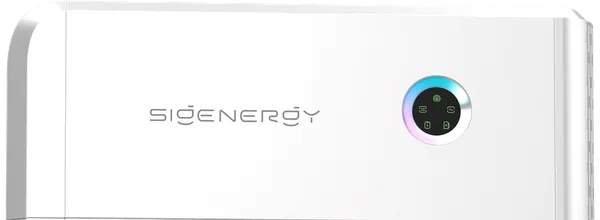
EC (SigenStor EC)
Top of the stack · 700 × 300 × 260 mm
The SigenStor's inverter: turns solar power into household power and charges and discharges the batteries. TAMNIYOM sells 5 and 10 kW (single-phase) and 5, 10, 20 and 25 kW (three-phase)
Sigen Hybrid
On the wall · 99 mm slim
A quiet wall inverter without fans. Start with solar only and add batteries and backup later; batteries connect through a SigenStor BC
SigenStor BAT 6.0 / 10.0 battery
Middle of the stack · 767 × 270 × 265 mm, both sizes
Stores power for the evening, the night and power cuts. 6.02 / 9.04 kWh, 3 / 4.6 kW each. 1–6 per set, both sizes can be mixed. 62 / 78 kg
SigenStor BC
Top of the battery stack (Hybrid) · 765 × 109 × 260 mm
Links the batteries to a Sigen Hybrid; needed when a Hybrid has batteries. Comes with the ground-mount base
Ground-mount base (Installation Kit)
Bottom of the stack
The base the stack stands on, with adjustable feet so it stands straight on a hard floor. Every SigenStor uses one; with up to 2 batteries it can go on the wall instead
SigenStor EVDC
Under the EC · 700 × 270 × 260 mm
DC car-charging module with a CCS2 plug, 12.5 kW (25 kW with the fast-charging licence), 7.5 or 10 m cable. With an EVDC the stack takes up to 5 batteries
Sigen Gateway
On the wall by the main switchboard
Switches to backup power in a power cut; used in the backup and off-grid set-ups. Chosen by single / three-phase, the load on backup and the breaker size. In a power cut it supplies up to the inverter's size
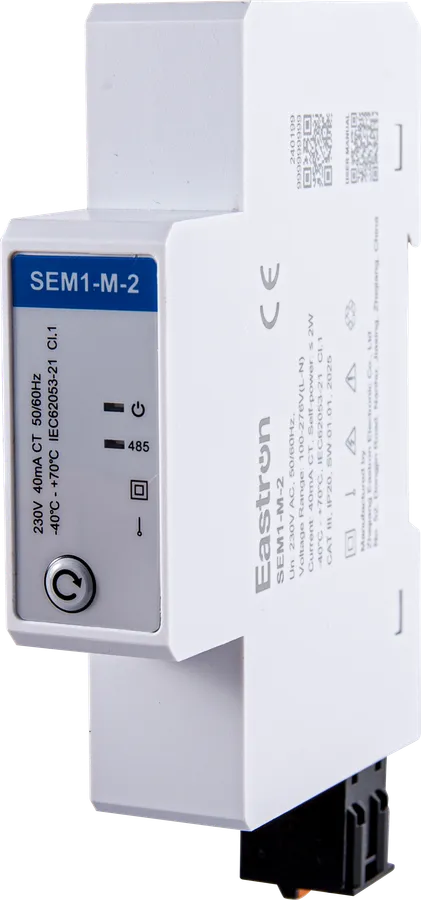
Sigen Sensor
In the main switchboard
A meter with clamps (CTs) around the cables that tells the system how much the home uses. Chosen by single / three-phase and the main cable's current
Sigen CommMod NS
Plugs into the unit
4G SIM module for sites without internet; a data SIM is bought separately (normally the system connects by LAN cable or Wi-Fi)
Battery sizing
Sizing the inverter and batteries, simply
The same method as the installer training, in round numbers to show the idea. The team works it out properly from the electricity bill and the real appliances.
1. Power used at once (kW) → inverter size
Add up the appliances that run at the same time; the inverter must be bigger. On three-phase the inverter splits its power equally between the phases, so the busiest phase must stay within the power per phase
Single-phase, 7 kW at once → 10 kW inverter · three-phase, 10 kW (phase A 2, B 5, C 3 kW) → 20 kW EC, which gives 6.67 kW per phase (10 kW gives 3.33 kW per phase, not enough for phase B)
2. The batteries must keep up with the load
Each battery can only give so much power: a 6.0 gives 3 kW, a 10.0 gives 4.6 kW. All the batteries together must give more than the load running at once without sun
7 kW at once → at least 2 × 10.0 (9.2 kW) or 3 × 6.0 (9 kW) · three-phase 10 kW → at least 3 × 10.0 (13.8 kW) or 4 × 6.0 (12 kW)
3. How long should the backup last (kWh)
Load (kW) × hours = battery capacity needed (kWh)
10 kW of backup for 4 hours = 40 kWh → at least 5 × 10.0 (45 kWh)
4. The panels must make more than the home uses in the day
The batteries only charge when the panels make more than the home is using in the day
20 kWh used in the day: about 5 kWp of panels just covers it, nothing left to charge · about 6.25 kWp leaves about 5 kWh to charge the batteries
Examples from the Sigenergy installer training (June 2026) · kW = power (what is being used now) · kWh = energy (what was used in total; 1 kW for 1 hour = 1 kWh = 1 unit on the bill)
Before installing
Good to know before installing
The team surveys every site first. These points come from Sigenergy's installation training
Where to put it
It can go outdoors (IP66 against water and dust), best out of direct sun with nothing in the way, or in a well-ventilated garage. Away from bedrooms and daily work spaces, away from children, easy for the installer to reach
Space around the stack
For cooling: at least 40 cm above, 30 cm each side, 35 cm below and 40 cm in front
Floor and wall
On a hard floor, with the base's feet levelled so the stack stands straight. On the wall only with up to 2 batteries, on a straight, strong wall such as brick-concrete or concrete
Places to avoid
Attics, basements, places hard to reach, soft or uneven floors and leaning walls
Internet
Three ways: a LAN cable from the router, Wi-Fi (the antenna that comes with the unit) or a 4G SIM through a CommMod. Used to see and set the system in the mySigen app
Settings at installation
The installer sets the grid code for the area (PEA or MEA in Thailand) and the operating mode, such as maximum self-consumption or time-of-use (TOU)
Gateway / Sensor
Choosing the Gateway and the Sensor
Tables from the device-selection guide. The team checks the breaker and main cable before installing
Sigen Gateway
| Model | Power | Main breaker | Inverters | Smart Port |
|---|---|---|---|---|
| Home SP 12K | 12 kW | 63 A | 1 | – |
| HomePro SP | 12 kW | 63 A | 1 | 63 A |
| HomePro SP-F | 22 kW | 125 A | 1 | 63 A |
| Home TP 30K | 30 kW | 63 A | 1 | – |
| HomePro TP | 30 kW | 63 A | 1 | ✓ |
| C60-2 | 60 kW | 125 A | 2 | ✓ |
| C120-6 | 120 kW | 250 A | 6 | ✓ |
| C180-9 | 180 kW | 315 A | 9 | ✓ |
The Gateway and the inverter must carry the appliances on backup, and the main breaker should be the same as or bigger than the breaker of the backed-up part · in a power cut it supplies up to the inverter's size · SP = single-phase, TP and the C models = three-phase (C models for shops and factories)
Sigen Sensor
| Model | Clamps (CT) | Clamp hole | Max. current per CT |
|---|---|---|---|
| SP-CT100 | 1 | 16 mm | 100 A |
| SP-CT120-DH | 1 | 16 mm | 120 A |
| TP-CT100 | 3 | 16 mm | 100 A |
| TP-CT300-DH | 3 | 24 mm | 300 A |
| TP-CT600-DH | 3 | 36 mm | 600 A |
| TPX-CH | Ext. CT | – | xxx/5 A |
SP = single-phase, TP / TPX = three-phase · choose clamps that carry the main cable's current with a hole big enough for the cable · TPX-CH works with external xxx/5 A CTs
Questions
Common questions about building a set
What does one Sigenergy set need?
At least an inverter and a Sensor (except the set-ups with a whole-home Gateway or off-grid)
- SigenStor: ground-mount base + EC (1–6 batteries between the base and the EC)
- Sigen Hybrid: the wall inverter; with batteries, a SigenStor BC that comes with the base
- Backup in a power cut: add a Sigen Gateway
- No internet on site: add a CommMod
What is the difference between SigenStor and Sigen Hybrid?
SigenStor stacks the EC on the batteries in one unit and can take the EVDC car-charging module. Sigen Hybrid is a slim wall inverter that links to the batteries through a SigenStor BC. Both use the same SigenStor BAT 6.0 / 10.0 batteries
Can I add batteries later?
Yes, see set-up 1 (on-grid). With SigenStor put the base and the EC in now and add batteries later; with a Hybrid add batteries with a BC later. Old and new batteries work together
I already have an inverter of another brand. Can I add a Sigenergy battery?
Yes, this is AC coupling, set-ups 5–7. The Sigenergy inverter must be the same size as the existing one or bigger
- Set-up 5: storage only, 2 Sensors
- Set-up 6: add a Gateway for backup, 1 Sensor (one more for partial backup)
- Set-up 7: the existing inverter connects to the Gateway's Smart Port, no Sensor
When is a Gateway needed?
When the home should keep power in a power cut (set-ups 3, 4, 6, 7) and for off-grid (set-up 9). Just cutting the bill or storing power for the night needs no Gateway (set-ups 1, 2, 5)
How many batteries do I need?
Check two things: together the batteries must give more power than the load running at once (a 6.0 gives 3 kW, a 10.0 gives 4.6 kW), and the capacity must cover the hours you want. For example 10 kW for 4 hours = 40 kWh → at least 5 × 10.0. See "Battery sizing"
Can the batteries go on the wall?
Yes, with up to 2 batteries, using the wall-mount base instead of the ground-mount one, on a straight, strong wall such as brick-concrete or concrete. With 3 or more use the ground-mount base
How much does a set cost?
Press "Send to the team on LINE" or copy the list into a chat. The TAMNIYOM team replies with the price and checks the sizes for the home before installing
From Sigenergy's datasheets and the Sigenergy device-selection and installer-training documents of Brighten Generation (Feb–Jun 2026) · product pictures from Sigenergy